# Webhooks
# Overview
Webhooks allow you to receive instant notifications of configured events that happen on Xsolla’s side. You can use webhooks to automate back-end and supplementary functions of your application.
Examples of events that you can be notified about:
- payments, including purchases of virtual currency and items
- recurring payments and actions with subscriptions
- refunds
When a configured event occurs, Xsolla notifies your system about it via webhooks. For example, you can do the following after receiving a webhook:
- add to a user’s balance
- unlock new items for a user
- start subscription service
- block user after fraud detection
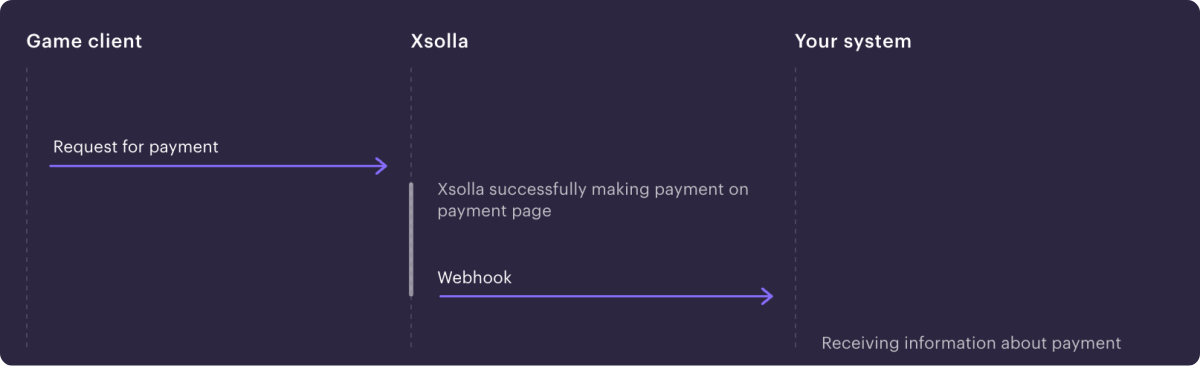
Below is an example of how a payment processing webhook works:
# Set up server side
The following settings have to be applied for webhooks to work correctly:
- Listen to webhooks at the following IP addresses: `185.30.20.0/24`, `185.30.21.0/24`, `185.30.23.0/24`.
- Application database must not contain two successful transactions with the same ID.
Notice
If your listener receives a webhook with an existing transaction ID, it must return the previous result for that transaction. It is not recommended to charge the user twice or create duplicate records in the database.
- A created [signature](https://developers.xsolla.com/webhooks/overview/#section/Sign-requests) has to match the one passed in the HTTP header.
- In case of an error, return [code 400](https://developers.xsolla.com/webhooks/overview/#section/Errors) (e.g., when a required parameter is missing or a recharge has failed). For temporary errors with your servers, use code 500.
Note
Xsolla API accepts conventional HTTP response codes for successful and failed requests. Code 204 indicates successful processing.
As internet connections are not always 100% reliable, webhooks may be lost or delayed. To address this issue, Xsolla resends failed webhooks until your listener receives them. Webhook resends are sent within 12 hours after the previous one until your listener confirms receiving. The maximum number of retries is 12.
Note
Although connection problems may result in lost, delayed, or duplicate webhooks, the most common cause is incorrect logic on the listener side.
# Sign requests
Digital signatures enable secure data transmission. To generate a signature:
1. Concatenate the request’s JSON body with your project’s secret key.
2. Apply SHA-1 hashing to the resulting string.
```
POST /your_uri HTTP/1.1
host: your.host
accept: application/json
content-type: application/json
content-length: 165
authorization: Signature 52eac2713985e212351610d008e7e14fae46f902
{
"notification_type":"user_validation",
"user":{
"ip":"127.0.0.1",
"phone":"18777976552",
"email":"email@example.com",
"id":1234567,
"name":"Xsolla User",
"country":"US"
}
}
```
```
curl -v 'https://your.hostname/your/uri' \
-X POST \
-H 'authorization: Signature 52eac2713985e212351610d008e7e14fae46f902' \
-d '{
"notification_type":
"user_validation",
"user":
{
"ip": "127.0.0.1",
"phone": "18777976552",
"email": "email@example.com",
"id": 1234567,
"name": "Xsolla User",
"country": "US"
}
}'
```
# Errors
Error codes for HTTP code 400:
| Code |
Message |
| INVALID_USER |
Invalid user |
| INVALID_PARAMETER |
Invalid parameter |
| INVALID_SIGNATURE |
Invalid signature |
| INCORRECT_AMOUNT |
Incorrect amount |
| INCORRECT_INVOICE |
Incorrect invoice |
```
HTTP/1.1 400 Bad Request
{
"error":{
"code":"INVALID_USER",
"message":"Invalid user"
}
}
```
Version: 1.0
## Servers
```
https://api.xsolla.com/merchant/v2
```
## Download OpenAPI description
[Webhooks](https://developers.xsolla.com/_bundle/deprecated-webhooks/index.yaml)
## Other
### Payment
- [POST payment](https://developers.xsolla.com/deprecated-webhooks/webhooks/legacy-payment.md): Sent whenever a user completes a payment. Includes payment details.
### Refund
- [POST refund](https://developers.xsolla.com/deprecated-webhooks/webhooks/legacy-refund.md): When a payment is canceled, Xsolla sends details of the canceled transaction in a webhook with the refund type to the webhook URL.
The webhook retry mechanism depends on who initiated the refund:
* If the refund was initiated on your side, the webhook isn’t resent. The payment is refunded to the user regardless of the response to a webhook.
* If the refund was initiated by a third party — e.g., a payment system or Xsolla Customer Support team — and in response to a webhook, a 5xx status code was returned, the webhook is resent at increasing intervals. The maximum number of retries is 12 within 48 hours from the first attempt.
For detailed information about the refund process, refer to the instructions.
Notice
The payment will still be refunded to the user if all of the following conditions are met:The refund was initiated by Xsolla.In response to a webhook, a 4xx status code was returned, or no response was received after all retry attempts, or a 5xx status code was returned.
When you save the webhook URL in Publisher Account, you can also set up receiving additional information in webhooks.
Note
If you registered in Publisher Account on or before January 22, 2025, you can find the toggles in your project in the Settings > Webhooks > Testing > Payments > Advanced settings section.
Toggle
Description
Show info about transactions via saved payment methods
Information is passed in the following custom parameters of the webhook:saved_payment_method:0 — the saved payment method was not used1 — the payment method was saved when making the current payment2 — the previously saved payment method is usedpayment_type:1 — one-time payment2 — recurring payment
Refund codes:
Code
Reason
Description
1
Cancellation by the user request / the game request
Cancellation initiated from Publisher Account.
2
Chargeback
Transaction chargeback requested.
3
Integration error
Issues in integration between Xsolla and the game.Recommendation: Do not add the user to blocklist.
4
Potential fraud
Fraud suspected.Recommendation: Add the user to blocklist.
5
Test payment
Test transaction followed by cancellation.Recommendation: Do not add the user to blocklist.
6
User invoice expired
Invoice overdue (used for postpaid model).
7
Fraud notification from PS
Payment refused by payment system. Potential fraud detected by PS.Recommendation: Add the user to blocklist.
8
Cancellation by the PS request
Cancellation requested by payment system.Recommendation: Do not add the user to blocklist.
9
Cancellation by the user request
The user was not satisfied with the game or the purchase for any reason.Recommendation: Do not add the user to blocklist.
10
Cancellation by the game request
Cancellation requested by the game.Recommendation: Do not add the user to blocklist.
11
Account holder called to report fraud
The account owner states that they didn’t make the transaction.
12
Friendly fraud
Friendly fraud reported.
13
Duplicate
Duplicate transaction for the same invoice.
### Partial refund
- [POST partial-refund](https://developers.xsolla.com/deprecated-webhooks/webhooks/legacy-partial-refund.md): When a partial refund is made, Xsolla sends details of the canceled transaction in a webhook with the partial_refund type to the webhook URL. Learn more about the partial refund process in these instructions.
When you save the webhook URL in Publisher Account, you can give permissions to receive detailed information in webhooks. To do that, set the following toggle to active in Publisher Account in the Project settings > Webhooks > Advanced settings section.
Note
If you registered in Publisher Account on or before January 22, 2025, you can find the toggles in the Project settings > Webhooks > Testing > Payments > Advanced settings section.
Toggle
Description
Show info about transactions via saved payment methods
Information is passed in the following custom parameters of the webhook:saved_payment_method:0 — the saved payment method was not used1 — the payment method was saved when making the current payment2 — the previously saved payment method is usedpayment_type:1 — one-time payment2 — recurring payment
Refund codes:
Code
Reason
Description
1
Cancellation by the user request / the game request
Cancellation initiated from Publisher Account.
3
Integration error
Issues in integration between Xsolla and the game.Recommendation: Do not add the user to blocklist.
5
Test payment
Test transaction followed by cancellation.Recommendation: Do not add the user to blocklist.
7
Fraud notification from PS
Payment refused by payment system. Potential fraud detected by PS.Recommendation: Add the user to blocklist.
9
Cancellation by the user request
The user was not satisfied with the game or the purchase for any reason.Recommendation: Do not add the user to blocklist.
10
Cancellation by the game request
Cancellation requested by the game.Recommendation: Do not add the user to blocklist.
### Get game keys
- [POST get-game-keys](https://developers.xsolla.com/deprecated-webhooks/webhooks/get-game-keys.md): We will be making API calls to your server to obtain game activation codes after each successful payment.
### Activate key
- [POST activate-key](https://developers.xsolla.com/deprecated-webhooks/webhooks/activate-key.md): When a user activates a key, Xsolla sends a notification to your webhook URL.
### User balance: Payment
- [POST user-balance-payment](https://developers.xsolla.com/deprecated-webhooks/webhooks/user-balance-payment.md): Sent whenever a user makes a payment.
### User balance: Purchase
- [POST user-balance-purchase](https://developers.xsolla.com/deprecated-webhooks/webhooks/user-balance-purchase.md): Sent when a user purchases something inside the game. Specifies the change in the user’s balance.
### User balance: Redeem coupon
- [POST user-balance-redeem-coupon](https://developers.xsolla.com/deprecated-webhooks/webhooks/user-balance-redeem-coupon.md): Sent when a user redeems a coupon to receive virtual items or virtual currency.
### User balance: Manual update
- [POST user-balance-manual-update](https://developers.xsolla.com/deprecated-webhooks/webhooks/user-balance-manual-update.md): Sent when a user’s balance is changed manually.
### User balance: Refund
- [POST user-balance-refund](https://developers.xsolla.com/deprecated-webhooks/webhooks/user-balance-refund.md): Sent when a user cancels a payment. Specifies the change in the user’s balance.