# 概要
Bundles are sets of items sold as a single unit. A bundle can include virtual items, virtual currency, virtual currency packages, game keys, and other bundles. Use bundles to create starter packs, seasonal offers, and special deals.
Use the following API call groups to work with bundles:
* Use API calls from the Admin subsection to create, update, delete bundles, and manage their visibility.
* Use API calls from the Catalog subsection to retrieve bundles.
Purchase limits are configured via the `limits` object when creating or updating a bundle. For more information, refer to the [Limits](/ja/api/catalog/limits-overview) overview. You can also configure [regional restrictions](https://developers.xsolla.com/ja/items-catalog/catalog-features/regional-restrictions/) to sell items in specific countries.
Note
For detailed information on configuring bundles, refer to the Bundles section.
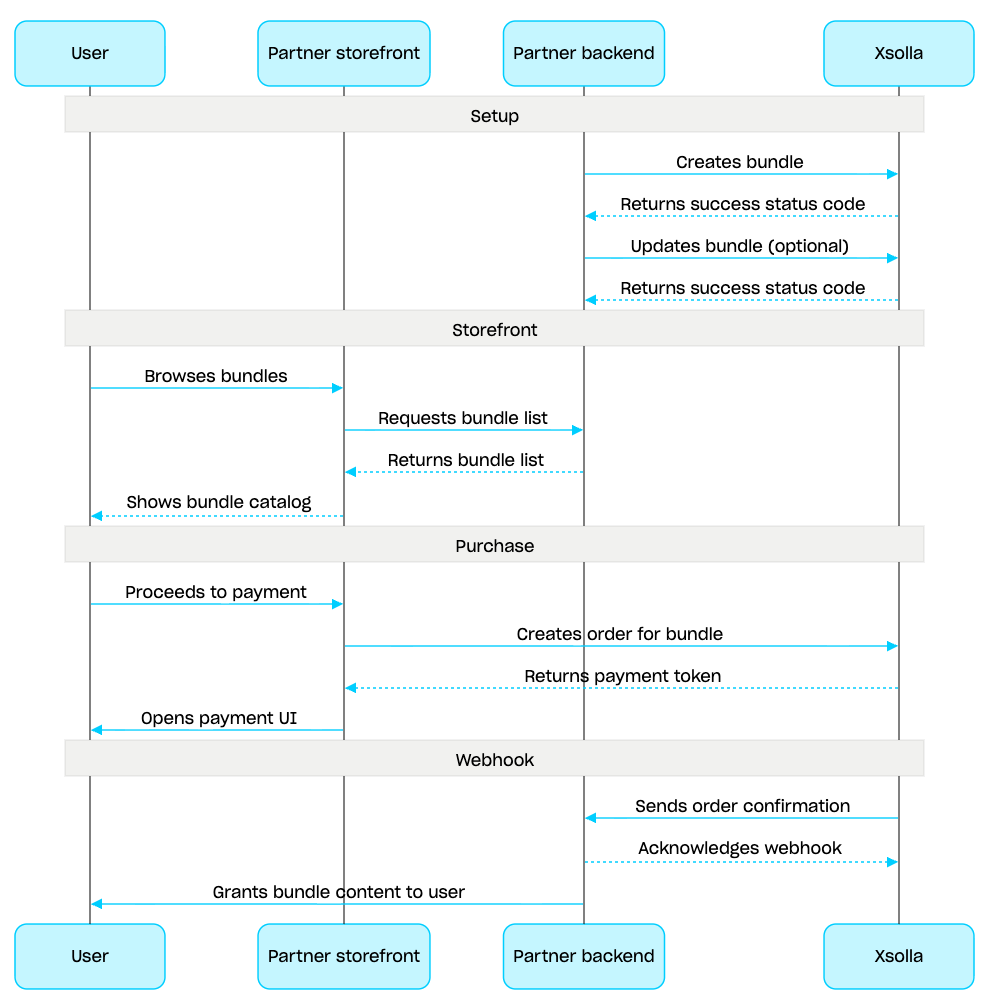
Bundle management scenario:
1. Create a bundle using the [Create bundle](/ja/api/catalog/bundles-admin/admin-create-bundle) API call. To verify the created bundle, use the [Get bundle](/ja/api/catalog/bundles-admin/admin-get-bundle) API call. To retrieve all bundles in the project, use the [Get list of bundles](/ja/api/catalog/bundles-admin/admin-get-bundle-list) API call.
2. If needed, use the [Update bundle](/ja/api/catalog/bundles-admin/admin-update-bundle) API call to modify the bundle content or settings.
3. Implement bundle display logic in your storefront using the [Get list of bundles](/ja/api/catalog/bundles-catalog/get-bundle-list), [Get specified bundle](/ja/api/catalog/bundles-catalog/get-bundle), or [Get list of bundles by specified group](/ja/api/catalog/bundles-catalog/get-bundle-list-in-group) API call.
4. Create an order using the [Cart and payment](/ja/api/catalog/cart-and-payment-overview) section. For example, for a fast purchase you can use the [Create order with specified item](/ja/api/catalog/payment-client-side/create-order-with-item) API call, passing the bundle SKU. The response contains a token for opening the payment UI.
5. Implement opening the payment UI to pay for the order.
6. Set up order status tracking, for example using [webhooks](https://developers.xsolla.com/ja/webhooks/overview), to promptly receive data on successfully paid items and grant them to the user.