# Xsolla event API
# Overview
* **Version:** 2.0.0
* **Servers**:
* `https://getupdate.xsolla.com/`
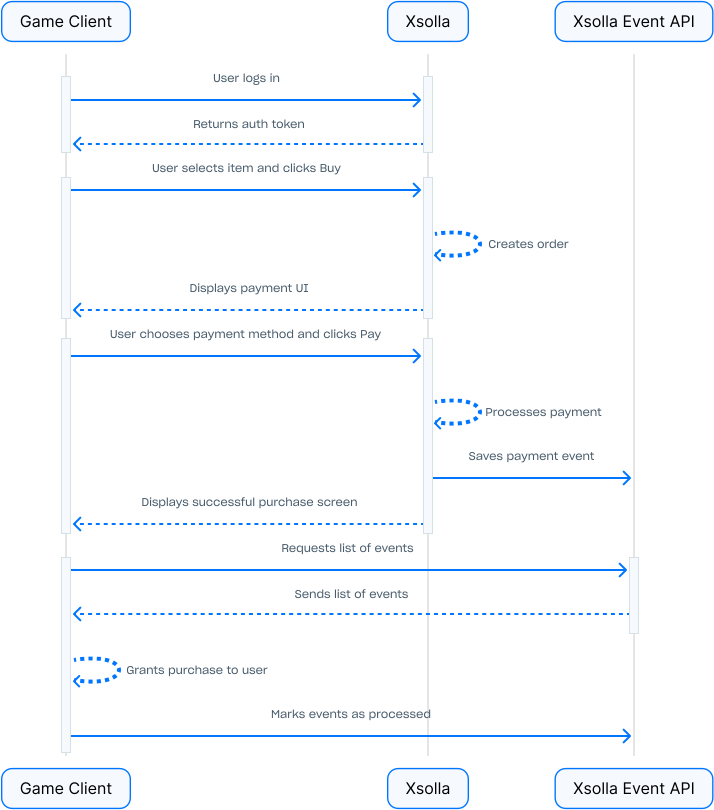
The Xsolla Event API is an alternative to using [webhooks](/webhooks/overview/#section/Overview). It allows you to receive information about payment events directly from your application's client via requests to Xsolla’s server. This approach eliminates the need to set up and maintain your own server for handling webhooks.
**Interaction between your application and Xsolla:**
# Limitations
When you use the Event API:
* You **can’t** reject operations, e.g., payments — all events are automatically considered approved.
* You **can’t** use webhooks — the Event API and webhooks are incompatible integration options.
**Comparison of the main features:**
| Feature |
Webhooks |
Event API |
| Request initiator |
Xsolla’s server. |
Your application’s client. |
| Infrastructure |
You need your own server. |
You don’t need your own server. |
| Event handling |
On your server. |
On your application’s client. |
| Operation rejection |
Supported. |
Not supported (all events are automatically considered approved). |
# How to set it up
Note
To enable Event API in your project, contact your Customer Success Manager or email at csm@xsolla.com or integration@xsolla.com.
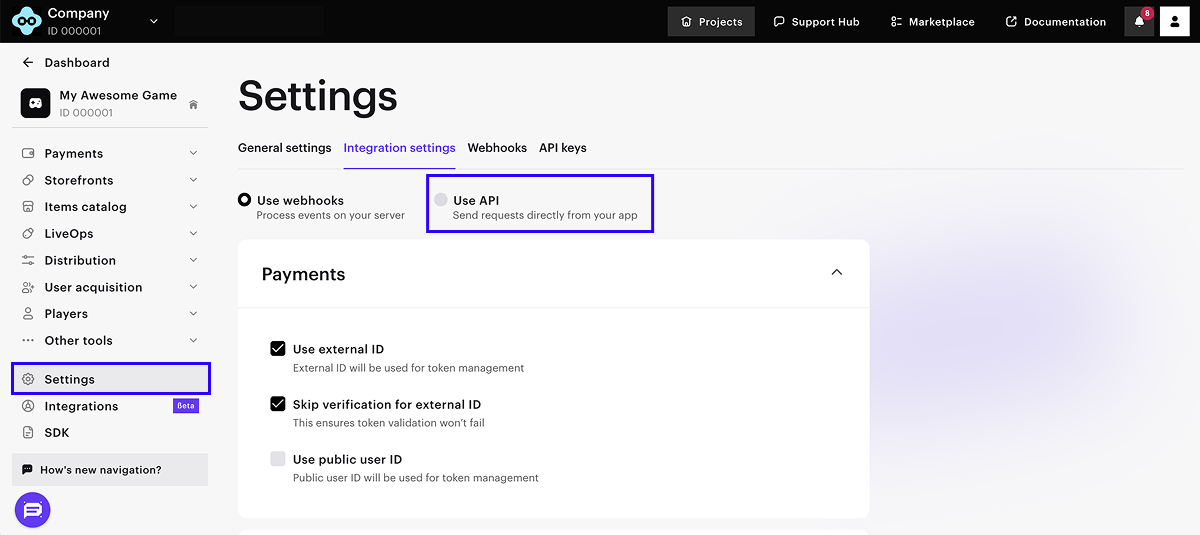
1. In your project in Publisher Account, go to the [Settings > Integration settings](https://publisher.xsolla.com/0/projects/0/edit/advanced) section.
2. Click **Use API**.
3. In the modal window that opens, enter the project ID and click **Use API**.
Notice
Switching to the events API will automatically disable previously configured webhooks, and they will no longer be sent to your server.
Note
The Xsolla Event API support is also available in the following Xsolla SDKs:
Version: 2.0
## Servers
```
https://getupdate.xsolla.com
```
## Security
### XsollaLoginUserJWT
To authenticate requests, you can use the [user JWT token](/api/login/overview/#section/Authentication/Getting-a-user-token) obtained during authentication via Xsolla Login. The logic for identifying the user during a purchase depends on the calls used:
* If you use client-side API calls, such as [Create order with specified item](/api/shop-builder/operation/create-order-with-item/), the user is automatically identified by the ID in the `sub` field of the JWT token.
* If you use server-side API calls, such as [Create token](/api/pay-station/operation/create-token/), you need to pass the value of the `sub` field from the JWT token to the `user.id.value` parameter.
Alternatively, to authenticate the request, you can pass the [payment token](/api/pay-station/operation/create-token/) to the `token` `GET` parameter.
Type: http
Scheme: bearer
Bearer Format: JWT
## Download OpenAPI description
[Xsolla event API](https://developers.xsolla.com/_bundle/@l10n/zh/api/event/index.yaml)
## API calls
### Get unprocessed event list for user
- [GET /events](https://developers.xsolla.com/zh/api/event/events/get-event-list.md)
### Mark event as processed
- [POST /events/{event_id}/processed](https://developers.xsolla.com/zh/api/event/events/mark-event-processed.md)